Useful additions for your space
Shop by problem
Use the best-for notes to find a relevant option. Check dimensions and compatibility before buying.
Disclosure: As an Amazon Associate, we earn from qualifying purchases. We may earn a commission when you buy through our partner links. It doesn't affect our recommendations or what you pay. Prices and availability change frequently; editorial ranges are planning estimates, not live quotes. Check the retailer for current prices, pack sizes, and availability. Learn more
Monitor Stand with Drawers
Lifts the screen to eye level and gives back the 20 x 9 inches of desk underneath — SimpleHouseware and Fellowes make the common ones. Best for: Desk clutter, cables, small supplies.
Cable Management Box
Hides a 6-outlet strip and the slack cord behind it; look for one with a lid vent so the strip isn't sealed in. Best for: Power strips, chargers, cable mess.
Desktop File Sorter
Tiered slots that keep the action pile visible and vertical instead of spreading across the desk. Best for: Bills, mail, in-progress paperwork.
Drawer Organizer Trays
Modular inserts, usually 3 x 6 and 6 x 9 inch, that stop a desk drawer becoming a junk drawer. Best for: Pens, sticky notes, clips, USB drives.
Floating Wall Shelves (Set of 3)
Vertical storage above the desk; anchor into studs at 16 inches on center, not into drywall alone. Best for: Books, plants, reference materials.
Under-Desk Headphone & Bag Hook
Clamp-on or adhesive hooks that move headphones and a bag off the desk and off the floor. Best for: Headphones, bags, cables.
1. Desk Setup & Layout
A standard desk is 29-30 inches tall and 24-30 inches deep, which gives you roughly 8 square feet of surface — and a monitor sitting flat on it occupies a 20 x 9 inch block of the most valuable real estate on the desk. Put the screen on a riser ($25-45), pull it back to 20-30 inches from your eyes with the top of the screen at or just below eye level, and you have both a better neck angle and a usable shelf underneath. Then clear the desk completely and put back only what you touch every day:
- Screen on a riser: 20-30 inches away, top edge at eye level, and the 20 x 9 inch footprint underneath becomes a landing spot for a laptop or notepad
- Keyboard and mouse: the only two things in the 12 inches directly in front of you
- One pen cup, 3-5 pens: the rest live in a drawer tray. A cup of 30 pens is a drawer that migrated onto the desk
- One capture tool: a notepad or a tablet, not both
- Task lamp: a clamp lamp costs $15-30 and frees the desk footprint a base lamp takes
Pro tip: Take a photo of your desk at the end of a productive day. That's your "reset state" — two minutes at 5pm returns the desk to the photo, and you never have to organize it again.
2. Cable Management
Cable mess is not a discipline problem, it is a gravity problem: every cord long enough to reach is also long enough to hang. The fix costs $15-25 and takes about forty-five minutes, once, if you do it in this order rather than tidying cord by cord.
- Unplug everything and pull the desk 18 inches off the wall so you can work behind it
- Mount the power strip under the desk — two adhesive mounting strips or two screws into the underside. A strip on the floor is a strip you will kick loose
- Put the strip and its slack in a cable box ($15-25). Pick one with a vented lid; a sealed box around a loaded strip is a heat problem
- Route each cable down one desk leg with adhesive clips, then bundle the excess with reusable Velcro ties every 6-8 inches. Zip ties are permanent and you will be back here in six months
- Label near the plug end — a folded flag of tape with the device name, so you never trace a cord by hand again
- Cut the count: a Bluetooth keyboard, mouse and headset remove three cables permanently, and one multi-port charger replaces three wall bricks
Buying the strip is also the moment to check what it actually is. A workstation strip should be a surge protector, not a plain relocatable outlet: look for a UL 1449 listing and at least a 1,000-joule rating on the box, and don't daisy-chain one strip into another.
3. Paper & File Organization
Paper piles because most people build a place to store it and no place to process it. Sort every incoming sheet into exactly three destinations, and keep only the first one on the desk — a tiered file sorter ($20-35) holds the action pile upright and visible instead of spread flat across the surface.
Action
Bills to pay, forms to sign, anything needing a reply. Lives in the desktop sorter. If it holds more than about 20 sheets, you are storing, not processing.
Reference
Tax records, insurance, warranties. Hanging folders in one drawer ($50-150 for a two-drawer cabinet, or a $20 file box).
Scan or shred
Anything past its retention date. A cross-cut shredder runs $30-80; see how long to keep what.
The system only holds if the sort happens on the way in. Open mail standing over the recycling bin, decide once per sheet, and put the sorter where you drop your keys rather than where you sit — paper that reaches the desk has already won.
4. Shelves, Drawers & Vertical Storage
Desk surface is the most expensive storage in the room and the walls above it are free. A set of three 24-inch floating shelves ($25-50) mounted above the desk adds six linear feet of storage in a footprint of zero — but only if the brackets hit studs, which sit at 16 inches on center in most homes. Drywall anchors alone are how loaded shelves end up on keyboards.
- Floating shelves ($25-50 for three): hang the lowest one 18-24 inches above the desk so you can still sit upright under it
- Pegboard or grid wall ($30-60): a 2x4-foot panel handles scissors, tape, headphones and a calendar. IKEA SKÅDIS and Wall Control's metal panels are the two systems with the widest accessory range
- Drawer trays ($15-25): modular inserts in 3 x 6 and 6 x 9 inch sizes, so the drawer has assigned parking rather than a general fund
- Rolling cart ($30-60): a 3-tier utility cart is about 14 x 18 inches and 30 inches tall — it slides into the gap beside a desk and rolls out of the room entirely when the space has another job
- Cube storage or a bookcase: the place for labelled bins of the things you use monthly, not daily
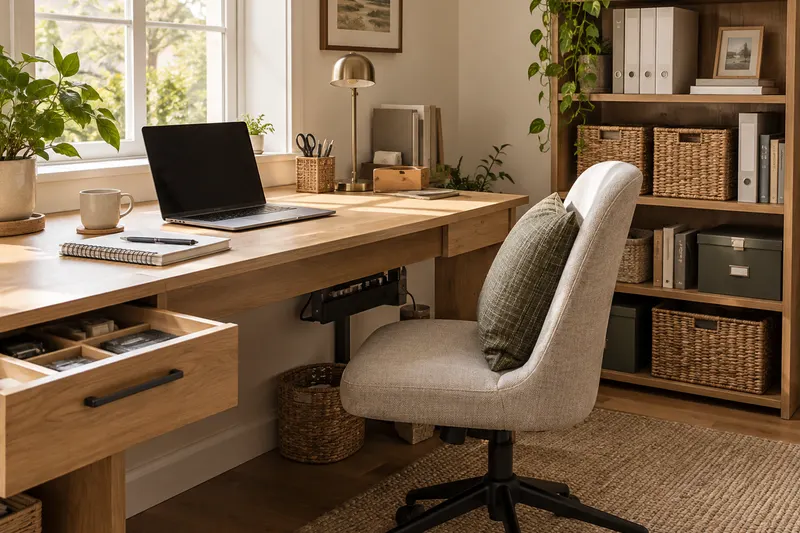
5. Shared Spaces & the Cloffice
Most home offices are not rooms; they are a corner of a room with another job. The cheapest real workspace in an apartment or a small house is a closet conversion, because the walls, depth and power are usually already there. A standard reach-in closet is 24 inches deep and 4-8 feet wide, and the whole conversion runs about $60-200.
- Cloffice ($60-200): a shelf board cut to the closet width, set at 29-30 inches on two cleats or brackets, plus a clamp light and a power strip. At 24 inches of depth you are planning for a laptop or one monitor — a dual-screen setup wants 30 inches
- Fold-down wall desk ($100-250): folds to 4-6 inches of wall projection; mount into studs, because the whole load hangs off the hinge plate
- Portable office box: one lidded bin holds the whole kit. Pull it out at 9am, put it away at 5pm — the single best setup for a dining table office
- Rolling cart ($30-60): same idea, but it stays loaded and just changes rooms
- Curtain or divider: a $20 tension rod and a curtain closes a cloffice visually at the end of the day, which matters more than it sounds like it should
One rule for every shared setup: the workspace has to be able to disappear in under five minutes. If closing down takes longer than that, it never happens, and the office slowly annexes the room.
6. Office Supply Organization
Group supplies by the moment you reach for them, not by what they are. Three zones cover a home office: writing and marking in the drawer tray you open daily, fastening and repair in the second tray, and shipping supplies (boxes, packing tape, labels) nowhere near the desk — they are bulky, used monthly, and belong in a closet or the garage.
- One in, one out on consumables: keep one backup of each and buy the next only when the backup opens
- Tech odds and ends — USB drives, adapters, spare batteries — in one labelled tray, checked twice a year, because half of it is for devices you no longer own
- Test the pens. It takes four minutes and usually clears a third of the cup
7. How Long to Keep Paperwork
Most home offices store paper by default because nobody knows when it is safe to throw it out. The retention rules below are the storage answer: everything in the first four rows fits in a single drawer of hanging folders, and the permanent tier is a few dozen sheets that belong in a fireproof document bag rather than a filing cabinet. These are the general rules — confirm your own edge cases with your accountant.
Scan before you shred, not after. A phone scanner app plus a cross-cut shredder ($30-80) clears a banker's box in an evening, and a box of paper that never comes back is worth more square footage than any organizer on this page.
8. Storage Solutions at a Glance
Every price here matches the product cards below and the figures used throughout this guide. Tap a row to shop the fix.
What the whole thing costs
Three pieces, $55-95: monitor riser ($25-45) + cable box ($15-25) + drawer trays ($15-25). All six desk pieces, $110-200 — add the file sorter ($20-35), floating shelves ($25-50) and an under-desk hook ($10-20). A filing cabinet ($50-150) is the only item worth deferring until you know how much reference paper actually survives the retention rules.
Browse the storage options above once you know what your space needs.
Doing the whole house?The free 12-week planner takes one room a week, with a printable checklist for each. Get the planner. No email required.
Home Office Storage FAQ
How much does it cost to organize a home office?+
A three-piece starter runs $55-95: a monitor stand with drawers ($25-45), a cable management box ($15-25), and a set of drawer organizer trays ($15-25). Adding a desktop file sorter ($20-35), floating shelves ($25-50), and an under-desk hook ($10-20) brings the full desk build to $110-200. The only line items that jump past that are a filing cabinet ($50-150) and a pegboard or grid wall ($30-60).
How do I organize a home office in a small space?+
Build up, not out. A standard reach-in closet is 24 inches deep and 4-8 feet wide, which is enough for a cloffice: a shelf board cut to width and set at 29-30 inches on two cleats, a clamp light, and a power strip — $60-200 all in. At 24 inches of depth you are planning around a laptop or a single monitor, not a dual-screen setup. In a shared room, a wall-mounted fold-down desk ($100-250) or a 3-tier rolling cart (about 14 x 18 inches of footprint, 30 inches tall, $30-60) lets the office disappear at 6pm.
What is the best way to manage cables in a home office?+
Do it in one pass, in this order: unplug everything, mount the power strip under the desk with adhesive strips or two screws, put the strip and its slack in a cable management box ($15-25), run each cable along a desk leg with adhesive clips, bundle the excess with reusable Velcro ties every 6-8 inches, then label each cable with a flag of tape near the plug end. Buying the strip is the moment to check its specs too — a workstation strip should be a surge protector with a UL 1449 listing and at least a 1,000-joule rating.
How long should I keep paperwork in a home office?+
The IRS's general rule is three years from the date you filed, extended to seven if you claimed a loss from worthless securities or a bad debt deduction, and to three years after you sell for records that establish a home's cost basis. Bank and card statements are a one-year keep unless they support a deduction; pay stubs go once you have reconciled them against the W-2. Vital records — birth and marriage certificates, Social Security cards, passports, wills, deeds, discharge papers — are permanent and belong in a fireproof document bag, not a filing drawer. Confirm the edge cases with your accountant; the point for storage is that everything else fits in one drawer.
See our best storage bins
Desk organizers, cable management, and office storage solutions — compared and ranked.
See Top Picks